A home for the whole picture
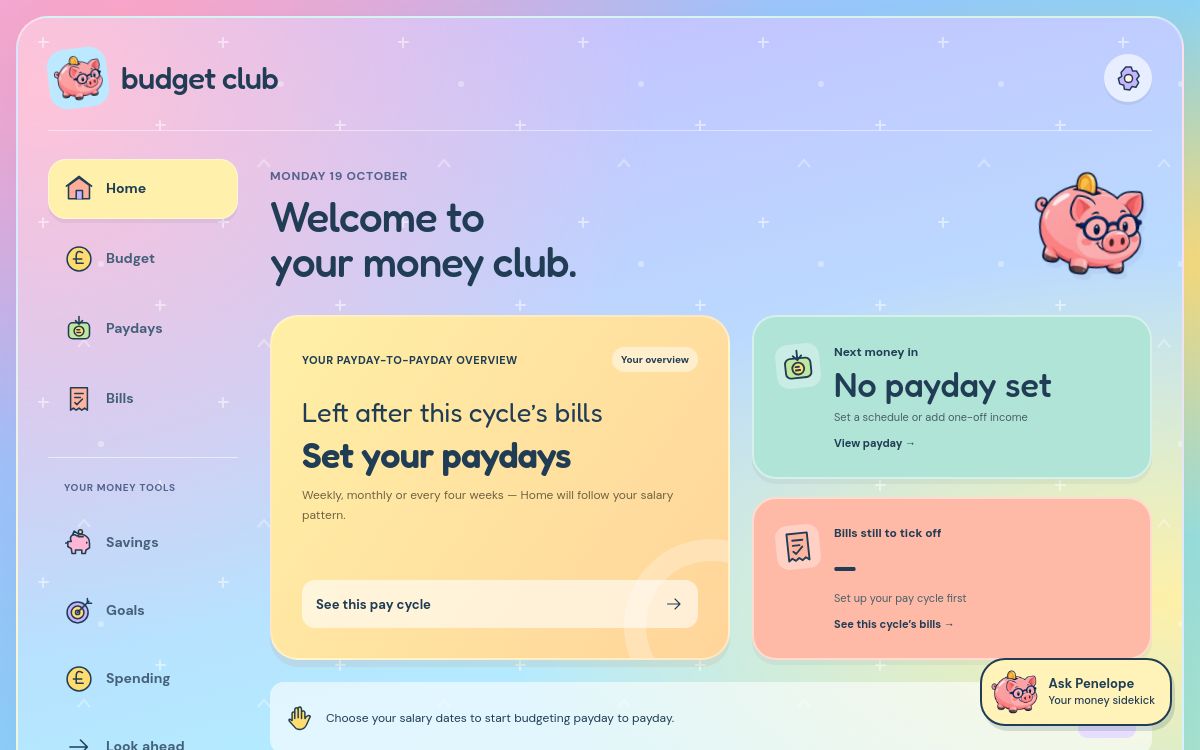
See your payday-to-payday overview, upcoming income and bills still to tick off. A calmer place to start.
 budget club.
A FRIENDLIER WAY TO BUDGET
For payday plans, rainy-day pots and the things you can’t wait to do. Make room for real life with Budget Club.
Explore the web app on your phone, iPad or computer.
Packed for life’s little adventures.
THE GOOD STUFF
Bring the moving parts of your money into one cheerful place. Start small. Make it yours.
See your payday-to-payday overview, upcoming income and bills still to tick off. A calmer place to start.
Weekly, fortnightly, every four weeks, monthly or month-end. Plan salary and PIP on separate schedules, edit overtime and add a one-off bonus.
Add due dates, choose direct debit or manual, split costs fairly and edit or delete bills as life changes.
Add your savings accounts, update their balances and see the total. Give every pot its own little purpose.
Set a target and a date. See the contributions left and an estimated amount to save each payday, week or month.
Record spending and refunds, plan allowances and savings transfers, and leave yourself a buffer for life’s little surprises.
REAL LIFE DOESN’T ALWAYS FIT A CALENDAR MONTH
Paid every four weeks? Your bills still have their own dates. Budget Club groups dated bills into the pay cycle that covers them.
Choose your pattern and record the money you receive.
See what that pay needs to cover—even across two calendar months.
Plan spending, savings and a little breathing space.
9 Oct → 6 Nov 2026
Example only: income − listed bills − savings. The 1 October mortgage belongs to the previous pay cycle. This is not your live budget.
COME ON IN
Familiar colours. Clear next steps. And a friendly face cheering you on.

*In our completely biased opinion.
MEET YOUR MONEY SIDEKICK
She’s got glasses, a little backpack, a well-packed wallet and a soft spot for a sensible savings pot. Penelope helps you find your way around Budget Club, one little question at a time.
Open Ask Penelope in the app for clear explanations and useful shortcuts. No judgement. No need to know all the budgeting words.
Penelope is a built-in guide with prepared answers, not an AI chatbot or financial adviser.
Say hello in the appA FEW MORE THINGS IN YOUR CORNER
Explore a 90-day cash-flow forecast based on what you have entered.
Try repayment what-ifs with the debt calculator. Estimates help you explore your options.
Import a supported bank CSV, review the entries and check for duplicates before adding them.
Export your budget and import it again when you need a copy. Your data, kept useful.
Forecasts and calculators are estimates based on your entries. They don’t connect to your bank or move money.
WHY THERE’S A CLUB
Budget Club started with a real-life tangle: four-weekly pay, monthly bills, shared costs and plans worth saving for.
We wanted a place that made those moving parts easier to understand—and felt welcoming enough to come back to. So we made one. Then we gave it a pink piggy bank with glasses.
A little clarity. A little confidence. A little club for you.
GOOD QUESTIONS, FRIENDLY ANSWERS
Here’s what to know before you make yourself at home.
Not at all. Start with when you get paid and the bills you know about. You can add savings, goals and everyday spending as you go. Penelope is there to explain the app in plain language.
You’re in the right club. Choose weekly, fortnightly, every four weeks, monthly or the last day of the month. Salary and PIP can have different schedules, and you can record extra income separately.
Budget Club can treat a scheduled direct debit as assumed paid after its due date. It cannot check your bank or confirm a payment cleared. Manual bill reminders appear in the app when a bill is due; they are not phone push notifications.
Yes. Set the full bill amount and your share, so your budget reflects what you pay. You can also share an account budget with someone in your household using their sharing code. Each person keeps their own sign-in; sharing lets them see and edit the whole selected budget.
Create an account to save budgets online and sync them across your devices. A device-only budget stays in that browser until you deliberately copy it into your account. Keep regular backups, especially before clearing browser data or resolving conflicting edits.
Not currently. You enter transactions yourself or import a supported bank CSV and review it. Budget Club does not move money, pay bills or verify bank balances.
No. Penelope is a built-in guide with prepared explanations and helpful app shortcuts. She can help you understand the app and its money-planning tools; she is not a financial adviser.
Yes—the web app adapts to all three. Open it in your browser and sign in to use the same account budget across devices. The iPhone app is in development; Budget Club is not available on the App Store yet.
The current web app opens without a checkout or subscription. Pricing for a future commercial release has not been announced. There is no payment or sign-up form on this website.
YOUR NEXT LITTLE STEP
The everyday essentials. The rainy-day buffer.
That holiday you keep thinking about.
Current web version · no account needed to explore